
Sound familiar?
- Writing out quotes on paper or in WhatsApp - looking unprofessional against competitors
- Spending an hour pricing every job from scratch when most jobs use the same parts and labour
- Rewriting the same standard quote from scratch every time a similar job comes in
- Clients ask "can you do it without the boiler upgrade?" and you redo the whole quote
- No way to take a deposit on acceptance, so cash flow lags the work
Why tradespeople choose VioTrade
AI estimating from a job description
Type or speak a description of the work and AI drafts the line items - labour, materials and quantities - pulling from your saved product catalogue so prices are accurate.
Product catalogue for fast quoting
Save your standard materials and labour rates once. Drop them into quotes in seconds. Cost prices stay private to you for margin tracking.
Optional add-ons and choice groups
Offer the client extras they can tick or "pick one" groups (5 year vs 10 year warranty). They configure their own scope, you see the live total.
Reusable quote templates
Save your standard quotes (boiler swap, full rewire, fitted kitchen) and load them in one tap. Edit the price, add the client, send.
Deposits on acceptance
Set a deposit percentage. The moment your client accepts, we auto-create and email a deposit invoice with the right VAT split.
Per-line VAT
Mix 20%, 5% and 0% items on a single quote. Useful for boiler installs, energy efficiency work and mixed labour and parts jobs.
Photos of what they are buying
Put product photos on the quote and they print as a gallery at the end - the actual boiler, the actual tile, the actual panel. Much harder to be undercut on a spec the customer can see.
Your own wording, saved as you go
Lines you write on quotes and invoices are saved as you go, so the next time you start typing the same job you pick your own wording and your own price instead of writing it again.
Auto-convert to invoice
When a quote is accepted, convert it to an invoice with one tap. Deposit already paid? The final invoice nets it off automatically.
How it works
Describe the job or pick a template
Type a few lines about the job and AI drafts the quote, or load a saved template. Adjust the line items, mark some as optional, set a deposit %.
Send to your client
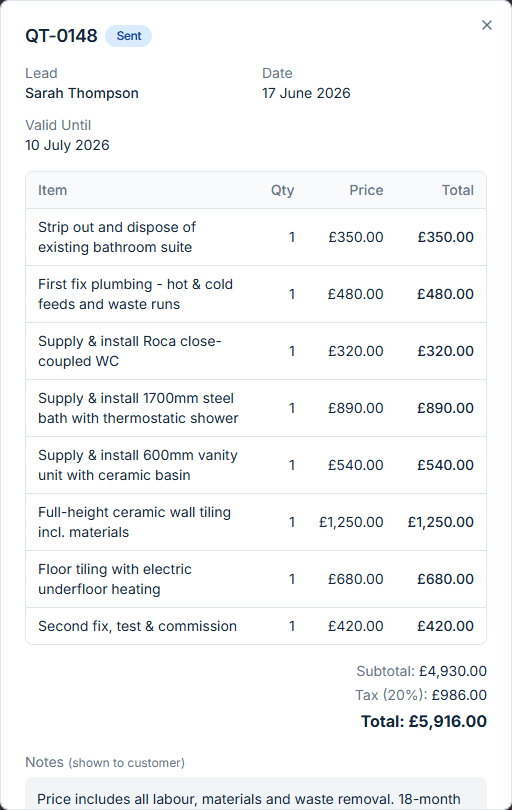
Client receives a professional PDF quote by email with an accept page where they tick the options they want and see the live total.
Win the job and the deposit
When they accept, a job is created, the deposit invoice is emailed automatically, and you can convert the quote to a final invoice when done.
Quotes include the right UK VAT breakdown and sync to Xero automatically. UK tax codes (20%, 5%, 0%, exempt) map cleanly so your accountant has nothing to fix.
“Before VioTrade I was losing jobs to other electricians just because my quotes looked scruffy. Now I win more work and get paid quicker.”
Frequently asked questions
What is the best quoting software for tradesmen in the UK?
VioTrade is quoting and invoicing software built for UK tradespeople. You can draft quotes with AI from a short job description, save reusable templates and a product catalogue, offer optional add-ons, take a deposit on acceptance, and convert an accepted quote to an invoice in one tap. It handles UK VAT and syncs to Xero. Try it free for 14 days, no card required.
Can I try the quoting software before I pay?
Yes. VioTrade starts with a 14-day free trial with no credit card required, so you can build and send real quotes before deciding. After that it is one plan at £20 a month that includes quoting, invoicing, job management and everything else - no per-feature add-ons.
Can I turn a quote into an invoice?
Yes. When a customer accepts a quote, VioTrade creates the job automatically and lets you convert the quote to an invoice in one tap. If a deposit was already paid, the final invoice nets it off with the correct VAT split - no re-typing and no maths.
How much does quoting software cost?
VioTrade is one simple plan at £20 per month (or £200 a year) with every feature included - quoting, invoicing, job management, scheduling, expenses, CRM and the website builder. No per-feature add-ons and no setup fees.
Can I send quotes from my phone while I'm on site?
Yes. VioTrade is mobile-first for iOS and Android, so you can build and send a professional quote from the customer's kitchen or the van, and they can accept it online there and then. The same quotes are on the web app when you're at a desk.
Can customers accept quotes online and pay a deposit?
Yes. Customers get a professional PDF quote with an online accept page where they tick any optional extras and see the live total. Set a deposit percentage and the deposit invoice is created and emailed automatically the moment they accept.